Kupo

Kupo is a very fast and lightweight chain-index for the Cardano blockchain. It is like a lightweight version of db-sync. Chain indexers are useful to developers and service providers in that they process and organize raw blockchain data to suit developer needs.
Similar to ogmios, we are going to grab a pre-compiled static kupo binary a server.
cd /tmp

wget https://github.com/CardanoSolutions/kupo/releases/download/v2.11/kupo-v2.11.0-aarch64-linux.zip
Unzip it
unzip kupo-v2.11.0-aarch64-linux.zip
Copy it to our bin directory
cp /tmp/bin/kupo /home/n(x)/preview/bin/
Again, make sure we have it in the right place
which kupo
kupo --version

Let's create a startup script.
nano /home/n(x)/preview/scripts/kupo_start.sh
Copy the follwing into the kupo_start.sh file.
#!/bin/bash

# Kupo configuration:
# - Using local Ogmios instance on port 1337
# - Matching all patterns with "*"
# - Starting from specific block
# - Deferring DB indexes for faster startup
# - Working directory in user's home
# - Listening on all interfaces on port 1442

/home/n(x)/preview/bin/kupo \
--ogmios-port 1337 \
--match "*" \
--since "54412148.656e903c510441032ad566d26fecf7be98882bdefde6a1ed961cd8e7bfa9d18a" \
--defer-db-indexes \
--workdir /home/n(x)/preview/kupo-db \
--ogmios-host 127.0.0.1 \
--host 0.0.0.0 \
--port 1442
Save and exit, ctrl + o and ctrl + x.
Make it executable and start it.
chmod +x /home/n(x)/preview/scripts/kupo_start.sh

cd /home/n(x)/preview/scripts/

./kupo_start.sh
You should see output of kupo syncing.
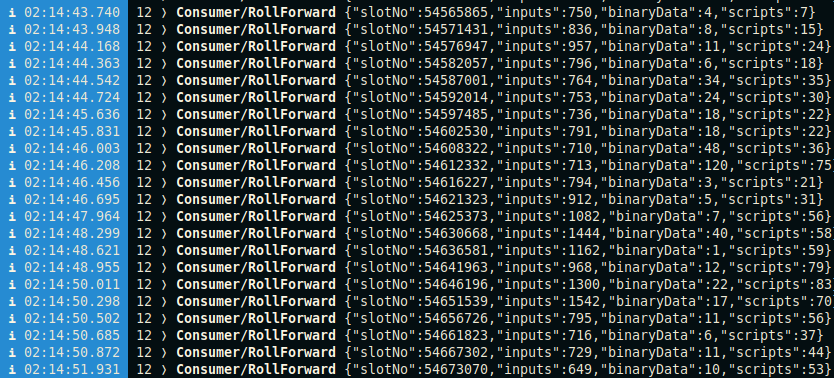
Exit the process ctrl + c
Now let's make another service file in the scripts directory.
nano /home/n(x)/preview/scripts/kupo.service
Copy the following into your service file.
[Unit]
Description       = Kupo
Wants             = network-online.target
After             = network-online.target

[Service]
User              = n(x)
Type              = simple
WorkingDirectory  = /home/n(x)/preview
ExecStart         = /bin/bash -c '/home/n(x)/preview/scripts/kupo_start.sh'
KillSignal        = SIGINT
RestartKillSignal = SIGINT
LimitNOFILE       = 24000
Restart           = always
RestartSec        = 7
SyslogIdentifier  = kupo

[Install]
WantedBy          = multi-user.target
Copy the service file to your system directory.
sudo cp /home/n(x)preview/scripts/kupo.service /etc/systemd/system/
Give it the correct permissions.
sudo chmod 0644 /etc/systemd/system/kupo.service
Reload daemons.
sudo systemctl daemon-reload
Start the service.
sudo systemctl start kupo.service
Check the status.
sudo systemctl status kupo.service
It should say "active"
If active, enable the service.
sudo systemctl enable kupo.service
Now lets allow connections to port 1442 for queries.
sudo ufw allow 1442/tcp
Reload.
sudo ufw reload
Now let's see if it is working!
From a local terminal session on your machine (meaning not logged into your server).
We are going to curl health metrics from your kupo endpoint.
curl "http://yourserverip:1442/health"
If everything is correctly configured, you will see output similar to this.
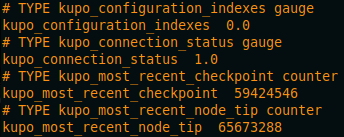
The documentation for kupo can be found here. See what other endpoints and data you can grab from your chain indexer!