Automating the Node
Before going too much further, I'd like to talk about RTS options for cardano-node
RTS stands for Runtime System, which is a software layer for Haskell programs that allows for the customization of thing such as:
- Memory Management
- Garbage Collection
- Concurrency and parallelism
- Exception handling
RTS options are a Haskell specific feature that the cardano-node takes specific advantage of.
These options can be implemented:
- during the compliling of the node
- as an override flag while running the node
We can check the RTS options baked into our static binary cardano-node
cardano-node +RTS --info
When we build our script next, we will override an RTS option to increase the threads cardano-node consumes from 2 to 4.
Warning! Only set the RTS flag value equal to the number of CPU cores on the server you are configuring. If you are unsure, just leave it at 2.
Building the script
The first thing we need to do to automate the running of our node is to create a startup script.
nano /home/n(x)/preview/scripts/node.sh
Add the following to the node.sh shell script we just created.
#!/bin/bash
#
# We will set a few variables to shorten our launch command
# Database Path
DB=/home/n(x)/preview/db
# Socket Path
SOCKET=/home/n(x)/preview/socket/node.socket
# Configuration File
CONFIG=/home/n(x)/preview/config/config.json
# Topology File
TOPOLOGY=/home/n(x)/preview/config/topology.json
# Host Address. We will set this to 'listen' for incoming connections
HOST=0.0.0.0
# Please change <your port> to the port for either your block producing node or relay
PORT=1694
#
# Command to run the node
#
/home/n(x)/preview/bin/cardano-node run --topology $TOPOLOGY --database-path $DB --socket-path $SOCKET --port $PORT --config $CONFIG --host-addr $HOST +RTS -N4
Once added, please save with ctrl + o and exit with ctrl + x
You'll notice that the variables set within this bash script more-or-less match what we input when starting the node on the command line, with the exception of the RTS option added at the end of the command to run the node at the bottom of the script.
Make the script executable.
chmod +x /home/n(x)/preview/scripts/node.sh
Test your script
cd /home/n(x)/preview/scripts

./node.sh
You should see output similar to the following
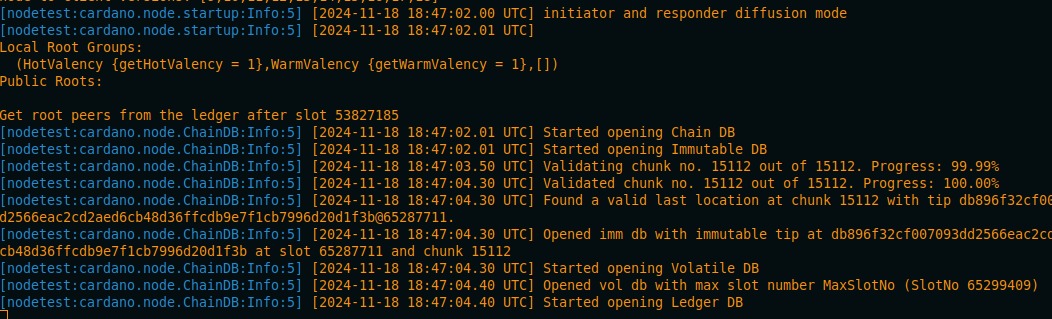
Kill the process once more with ctrl + c
Creating the Systemd Service
We are going to craft the service file in scripts directory we created earlier
cd /home/n(x)/preview/scripts

nano node.service
Add the following to our service file. This service file is very basic, depending on your needs you might want to add, change, or do things differently.
[Unit]
Description       = Cardano Node
Wants             = network-online.target
After             = network-online.target

[Service]
User              = n(x)
Type              = simple
WorkingDirectory  = /home/n(x)/preview
ExecStart         = /bin/bash -c '/home/n(x)/preview/scripts/node.sh'
KillSignal        = SIGINT
RestartKillSignal = SIGINT
LimitNOFILE       = 24000
Restart           = always
RestartSec        = 7
SyslogIdentifier  = cardano-node

 [Install]
WantedBy          = multi-user.target
Save the file with ctrl + o and exit with ctrl + x
Now let's copy our draft file to the permissioned location where services are located on our system.
sudo cp /home/n(x)/preview/scripts/node.service /etc/systemd/system/
We also need to ensure the service file has the appropriate permissions
sudo chmod 0644 /etc/systemd/system/node.service
Next, we need to reload the daemon so our system sees our new service file
sudo systemctl daemon-reload
Anytime a service file is changed, you'll need to reload the systemd daemon
Let's start the our new node service
sudo systemctl start node.service
Now we need to ensure our service was started successfully.
sudo systemctl status node.service
If all has gone well, we should be greeted with an output that states the service as active
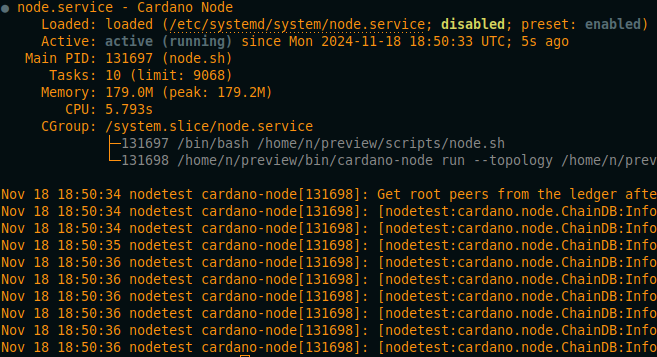
If it is active, we need to then enable the service so it automatically runs on system startup.
sudo systemctl enable node.service
You'll see that a symlink has been created for the service

Once this is done, systemd will ensure that the cardano-node is running the way we specified in the background, ready to use!
Just to make sure, let's query the tip of the chain.
cardano-cli query tip --testnet-magic 2
Hopefully you are in sync!
